


Disclosure: This post contains affiliate links. If you buy through these links, we may earn a small commission at no extra cost to you.
Make.com vs Pipedream: Which Automation Platform Scales Your Business Faster in 2025? (September 2025)
🤖This comprehensive comparison reveals which automation platform Make.com vs Pipedream delivers the best features, pricing, and performance for your workflow automation needs. Looking for the ultimate automation solution? Dive into our detailed review covering real-world testing, pricing analysis, and clear recommendations to help entrepreneurs, developers, and business owners choose the right platform.
When comparing Make.com vs Pipedream in 2025, understanding which platform suits your specific automation needs becomes crucial for business success.
🧭 Table of Contents
- Quick Overview: Make.com vs Pipedream
- Head-to-Head Comparison: Make.com vs Pipedream Key Categories
- Pricing Plan for Make.com vs Pipedream
- Make.com vs Pipedream: Who Wins for Specific Use Cases?
- 8 Best Key Advantages of Make.com vs Pipedream
- Making Money Online with These Tools
- Pros & Cons Summary
- Pricing Comparison
- The AI InspiredShifter Verdict & Recommendation
- Next Steps
- Frequently Asked Questions
Quick Overview: Make.com vs Pipedream
Make.com excels at visual, no-code automation for business processes, while Pipedream offers developer-first flexibility with code-level control. By understanding the unique strengths of each platform, you can pick the one that fits your automation needs.
This Make.com vs Pipedream comparison will help you understand which platform delivers the best ROI for your automation investment.
Make.com Review
Make.com (formerly Integromat) is a visual automation powerhouse that empowers users to build sophisticated workflows through an intuitive drag-and-drop interface. Make.com has established itself as one of the most user-friendly yet powerful automation platforms, enabling businesses to connect apps and automate multi-step processes without writing a single line of code.


Complex multi-path workflows in Make.com handle sophisticated routing and AI-powered content transformation
🎯 Ready to Automate Your Business with Make.com?
Start with 1,000 free operations and experience the power of visual automation. No credit card required!
Key strengths of Make.com include:
- Intuitive Visual Builder: Make.com’s drag-and-drop scenario builder provides a clear, flowchart-style visualization of your automation, making it easy to understand complex workflows at a glance and modify them without technical knowledge.
- Deep App Integrations: With over 1,500 pre-built integrations, Make.com offers comprehensive module libraries for each app, often supporting advanced features that other platforms miss, giving you granular control over your automations
- Advanced Logic Without Code: The platform supports sophisticated routing with multiple paths, conditional logic, iterators, aggregators, error handlers, and data transformations—all through visual configuration.
- Powerful Data Processing: Built-in tools for JSON/XML parsing, data transformation, filtering, and mapping enable complex data manipulation without programming skills.
- Affordable Entry Point: Starting at just $9/month with 10,000 operations, Make.com offers exceptional value for small businesses and growing teams looking to automate their processes.
Make.com’s versatility and accessibility come from years of development focused on balancing power with usability. The platform continues to expand its integration library and add sophisticated features while maintaining its signature intuitive interface, making enterprise-level automation accessible to businesses of all sizes.
Pipedream Review
Pipedream is a developer-first integration platform that revolutionizes how technical teams build automation workflows. Unlike traditional visual automation tools, Pipedream embraces code as a first-class citizen, allowing developers to leverage the full power of programming languages (JavaScript, Python, Go, and Bash) alongside pre-built integrations for maximum flexibility.

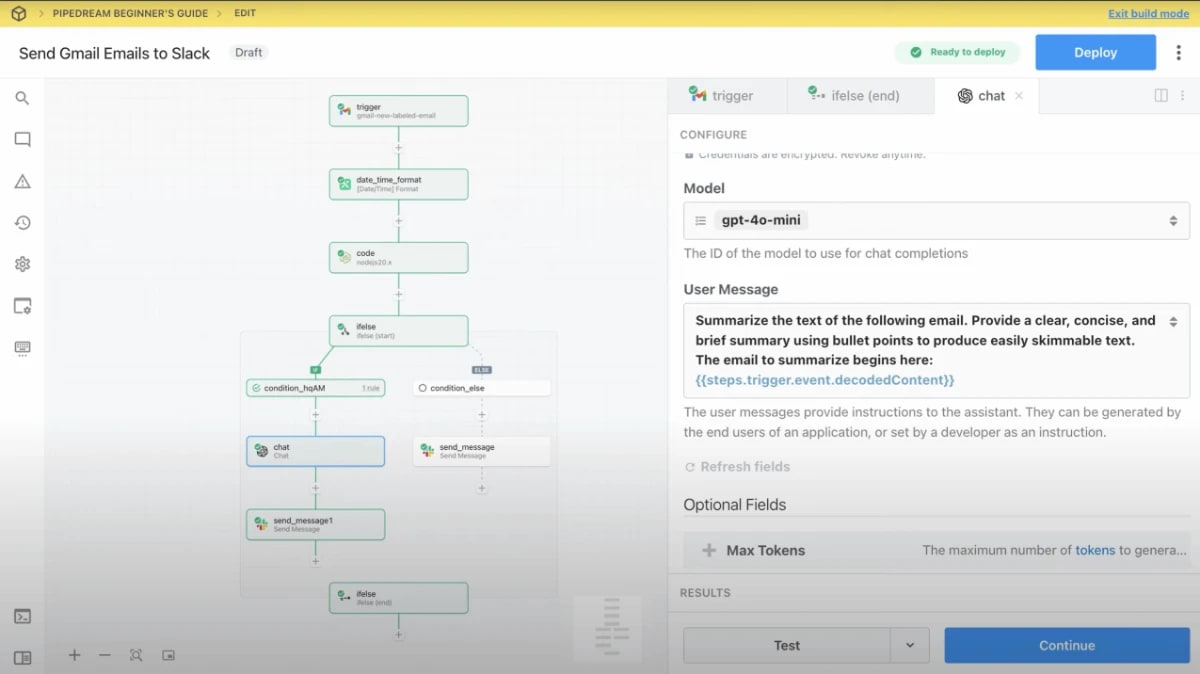

Pipedream’s developer-friendly interface combines visual components with powerful code editors for maximum flexibility
💻 Unlock Developer-Level Automation with Pipedream
Get 100 free credits monthly and build custom workflows with code. Perfect for technical teams!
Core capabilities of Pipedream include:
- Code-Level Flexibility: Write custom logic in JavaScript, Python, Go, or Bash directly within workflows. Import npm packages, use pip libraries, and implement any business logic imaginable without platform constraints.
- Massive Integration Library: Access over 2,800 pre-built integrations spanning every major SaaS tool, database, and cloud service, with new integrations added regularly by both Pipedream and the community.
- Event Sources & Webhooks: Create sophisticated event-driven architectures with event sources that collect, queue, and process events from any API or webhook, enabling real-time automation at scale.
- Developer-Friendly Features: Built-in authentication management, environment variables, data stores for persistence, execution logs with detailed debugging, and the ability to replay failed workflows make development seamless.
- Serverless Architecture: Workflows run on serverless infrastructure that automatically scales, with dedicated workers available on higher tiers for improved performance and reduced cold start times.
Pipedream’s unique selling point is its hybrid approach—combining the convenience of pre-built integrations with unlimited customization through code. This makes it ideal for development teams building complex integrations, prototyping SaaS products, or handling edge cases that visual-only tools cannot accommodate. The platform’s generous free tier and active developer community further enhance its appeal for technical teams looking to move fast without constraints.
Templates & CRO Strategies for Make.com vs Pipedream
Both platforms offer powerful capabilities for building conversion-optimized automations. Here’s how to leverage templates and CRO strategies to maximize your automation ROI.
Ready-to-Use Automation Templates
These battle-tested templates help you launch automations faster and start seeing results immediately:
Lead Nurture Flow
Automatically segment new leads, send personalized welcome sequences, and track engagement across email, SMS, and Slack notifications.
Make.com | Easy
E-commerce Order Sync
Sync orders from Shopify to Google Sheets, send fulfillment data to shipping providers, and trigger customer review requests.
Make.com | Easy
Analytics Dashboard
Pull data from multiple sources (GA4, Facebook Ads, Stripe) and generate daily reports with custom visualizations.
Pipedream | Moderate
Content Distribution
Publish blog posts automatically to Twitter, LinkedIn, Medium, and other platforms with optimized formatting for each channel.
Make.com | Easy
🚀 Start automating today with Make.com – free to sign up!
Conversion Rate Optimization (CRO) Strategies
Maximize your automation effectiveness with these proven CRO techniques:
Speed is Conversion
Set up instant response automations for form submissions and inquiries. Research shows that responding within 5 minutes increases conversion by 400%. Use webhooks to trigger immediate follow-ups when prospects show interest.
Smart Segmentation
Create dynamic audience segments based on behavior, engagement, and demographics. Personalized automation flows convert 2-3x better than generic ones. Tag users by interests, purchase history, and interaction patterns.
A/B Test Everything
Build parallel automation paths to test different messaging, timing, and offers. Use data to continuously optimize your workflows. Small improvements compound—a 10% boost across 5 steps equals 61% total improvement.
Re-engagement Loops
Automatically identify inactive users and trigger win-back campaigns. Set up conditional logic to send different messages based on last activity date, purchase recency, and engagement score. Recover 15-25% of churned customers.
VIP Treatment Automation
Create special workflows for high-value customers. Automate personalized gifts, priority support routing, exclusive offers, and relationship-building touchpoints. Your top 20% of customers drive 80% of revenue.
Multi-channel Orchestration
Coordinate touchpoints across email, SMS, push notifications, and in-app messages. Use automation to ensure consistent messaging while respecting frequency caps. Multi-channel campaigns see 3x higher engagement rates.
⚡ Build powerful workflows in minutes – try Pipedream now!
Pro Tip: Start with Templates, Then Customize
Don’t reinvent the wheel. Begin with proven templates, run them for 2-4 weeks to gather data, then optimize based on your specific audience behavior. Both Make.com and Pipedream offer template libraries—leverage them to launch faster and iterate smarter.
Head-to-Head Comparison: Make.com vs Pipedream Key Categories
1. Feature Set & Capabilities
The Make.com vs Pipedream debate often centers on this question of flexibility versus ease of use.
Why This Matters: The right features determine whether your automation actually solves real business problems or just creates more complexity.
Pipedream’s Performance: Pipedream offers over 2,800 pre-built integrations covering virtually every major SaaS tool, database, and API you can imagine. What sets Pipedream apart is the ability to write custom code directly in your workflows. You can use JavaScript, Python, Go, or Bash to implement any business logic, transform data in unlimited ways, and connect to services that don’t have pre-built integrations.
The platform provides sophisticated features like event sources (webhooks that collect and queue events), scheduled workflows, data stores for persistence, and built-in authentication for OAuth and API key-based services. You get access to npm packages, Python libraries, and the full power of programming languages within your automations.
Make.com’s Performance: Make.com boasts over 1,500 app integrations with deep functionality for each one. The platform supports complex scenarios with multiple paths, conditional logic, and data transformations without code. You get visual routers for branching logic, iterators and aggregators for data processing, error handlers for graceful failure recovery, and data stores for maintaining state between executions.
Make provides advanced features like webhooks, HTTP modules for custom API calls, JSON/XML parsing, filters for conditional execution, and the ability to schedule scenarios at any interval. The visual builder makes it easy to understand complex workflows at a glance.
Make.com supports drag-and-drop scenario building, powerful data transformation modules, iterators, aggregators, and built-in error handling — all of which are detailed on the Make.com how to guide page. On the Pipedream side, the platform supports running JavaScript, Python, Go, or Bash within workflows, built-in event sources, comprehensive authentication handling, and more — as described in the Pipedream documentation.
Direct Comparison & Nuance:
- For general-purpose automation, both platforms are highly capable with similar core functionality
- For developer flexibility, Pipedream takes the crown with full code support
- For visual workflow building, Make.com excels with its intuitive interface
- For pre-built integrations, Pipedream has more (2,800+ vs 1,500+) but Make offers deeper per-app functionality
2. Ease of Use & User Interface
Why This Matters: A great interface means faster implementation and easier maintenance of your automations.
Pipedream’s Performance: Pipedream’s interface is clean and developer-oriented but surprisingly approachable. The workflow builder combines visual components with code editors seamlessly. You can drag and drop pre-built actions or write custom code steps as needed.
The platform provides excellent debugging tools with detailed execution logs, the ability to replay events, and clear error messages. The code editor includes syntax highlighting, auto-completion, and inline documentation. While the interface assumes some technical knowledge, it’s not intimidating for those with basic programming skills.
Make.com’s Performance: Make.com offers the most polished visual automation experience on the market. The drag-and-drop interface is intuitive with a clear flow visualization showing how data moves between modules. Each module has a clean configuration panel with helpful hints and field descriptions.
The scenario editor provides real-time feedback, test execution capabilities, and visual error indicators. You can see sample data from each step, making it easy to understand what’s happening. The learning curve is gentle for non-technical users, and the interface feels modern and responsive.
Direct Comparison & Nuance:
- For non-technical users: Make.com is significantly easier with no coding required
- For developers: Pipedream feels more natural with its code-first approach
- For teams with mixed skills: Make.com accommodates more skill levels effectively
3. Flexibility & Customization
Why This Matters: Pre-built templates get you started, but custom logic separates powerful automation from basic task running.
Pipedream’s Performance: Pipedream offers virtually unlimited flexibility. Every workflow can include custom code in multiple languages. You can import npm packages, use environment variables, call any API, and implement any business logic imaginable. The platform doesn’t limit what you can build.
You can create custom integrations for apps that don’t have pre-built components. You can process data in any format, transform it however you need, and output to any destination. The code steps give you access to Node.js, Python, Go, or Bash runtime environments.
This flexibility means Pipedream can handle edge cases, unusual requirements, and complex transformations that would be impossible in purely visual tools.
Make.com’s Performance: Make provides excellent flexibility within its visual paradigm. You can use custom functions (JavaScript) for data transformation, create complex routing logic with multiple branches, and handle errors with specialized error handlers. The aggregator and iterator modules let you process data in sophisticated ways.
You can also use webhooks to trigger scenarios from anywhere, parse and transform JSON, work with variables and data stores, and create intricate multi-path workflows. However, you’re ultimately constrained by what Make’s modules support. If an app doesn’t expose a specific API endpoint through Make’s integration, you’ll need workarounds.
Direct Comparison & Nuance:
- For unlimited customization, Pipedream dominates because you can write any code and call any API without restrictions
- For visual flexibility, Make.com excels by providing powerful visual tools that handle most complex scenarios without requiring code
- For edge cases and unusual requirements, Pipedream’s code-level access wins every time
If your automation needs involve unique business logic or custom API calls, Pipedream is your best bet. If you want visual power without code, choose Make.
4. Integration Capabilities
When evaluating Make.com vs Pipedream for integration depth, both platforms take different but equally valid approaches.
Why This Matters: An automation platform is only as valuable as its ability to connect the tools you actually use daily.
Pipedream’s Performance: Pipedream offers over 2,800 pre-built integrations covering virtually every category: CRMs, databases, communication tools, marketing platforms, payment processors, cloud storage, project management, and more. Each integration includes multiple pre-built actions and triggers.
Beyond pre-built integrations, you can connect to any API using custom code. You can authenticate with OAuth, API keys, or custom auth flows. The platform handles authentication state, token refreshing, and connection management automatically.
You also get native integrations with databases (PostgreSQL, MySQL, Snowflake, etc.), cloud services (AWS, GCP, Azure), and AI providers. The combination of breadth and depth makes Pipedream one of the most integration-capable platforms available.
Make.com’s Performance: Make.com provides over 1,500 integrations with deep functionality for each. The integrations aren’t just surface-level—Make often supports advanced features of each app that other platforms miss. You get modules for actions, triggers, searches, and custom API calls.
The platform includes universal modules like HTTP, JSON, and XML tools that let you connect to any API even without a pre-built integration. You can set up custom webhooks, parse data in multiple formats, and handle complex API authentication.
Make’s integration depth is impressive. For popular apps, you often get dozens of modules covering every major use case. The visual interface makes it easy to understand how data flows between integrations.
Direct Comparison & Nuance:
- For total number of integrations, Pipedream leads with 2,800+ vs Make’s 1,500+
- For depth per integration, Make.com often provides more comprehensive app-specific modules
- For custom API connections, Pipedream wins with full code flexibility while Make requires HTTP modules
- For ease of integration setup, Make.com’s visual approach is more intuitive for non-developers
Choose Pipedream if you need maximum integration breadth and custom API flexibility. Choose Make if you want deep, visual integrations with popular business apps.
5. Speed & Performance
Why This Matters: Slow automations create bottlenecks. Fast, reliable execution means your business moves at the speed of thought.
Pipedream’s Performance: Pipedream offers impressive execution speed for a serverless platform. Workflows typically execute in seconds, with compute time charged per 30-second increments. The platform handles millions of events daily across thousands of workflows.
You get dedicated workers for faster execution on higher-tier plans, reducing cold start times. Execution history is retained for 7-30 days depending on your plan. The platform automatically scales to handle traffic spikes without manual intervention.
One advantage is Pipedream’s ability to process steps in parallel where possible, reducing total workflow execution time. The platform also provides execution statistics so you can monitor and optimize performance.
Make.com’s Performance: Make.com delivers solid performance with scenarios executing within seconds for most use cases. The platform processes operations (individual actions) efficiently, and you can monitor execution time for each module in your scenario.
Make provides instant scenario execution for webhook-triggered workflows and reliable scheduled executions. The platform handles errors gracefully and includes automatic retries for failed operations.
Performance can vary based on the apps you’re connecting to and the complexity of data transformations. Make’s visual interface makes it easy to identify which modules are taking the most time.
Direct Comparison & Nuance:
- For raw automation speed, both platforms are comparable, executing typical workflows in seconds
- For high-volume production workloads, Pipedream offers more granular control over infrastructure and scaling
- For parallel processing, Pipedream has a slight edge with better support for concurrent execution
- For monitoring performance, both provide excellent execution logs and performance metrics
Performance is essentially a tie between these platforms for typical automation use cases. Both deliver reliable, fast execution.
6. Pricing & Value for Money of Make.com vs Pipedream
Why This Matters: The best automation tool is worthless if it breaks your budget or has hidden costs that surprise you later.
Pipedream Pricing Details: The free tier includes 100 credits per month (roughly 100 workflow executions). Paid plans start at $29/month for 1,000 credits. Enterprise plans offer custom pricing with dedicated infrastructure. Compute time is charged in 30-second increments, making costs predictable for most use cases.
Make.com Pricing Details: The free tier provides 1,000 operations per month (where an operation is a single action in your scenario). The Core plan starts at $9/month for 10,000 operations. Pro plans scale to $16/month for 10,000 operations with advanced features. Operations can add up quickly in complex scenarios.
Value Analysis:
- Best entry-level value: Make.com at $9/month is hard to beat for small businesses
- Best for developers: Pipedream’s flexible credit system works well for technical teams
- Hidden costs: Make operations can multiply quickly; Pipedream credits are more predictable
Pricing Plan for Make.com vs Pipedream
The pricing structure represents one of the clearest differentiators in the Make.com vs Pipedream comparison, with Make.com offering a lower entry point for budget-conscious businesses.
| Platform | Free Tier | Paid Plans Start At |
|---|---|---|
| Pipedream | 100 credits/month | $29/month |
| Make.com | 1,000 operations/month | $9/month |
To help readers move from interest to decision, link to Pipedream’s detailed pricing page where they can compare free tiers, credits-based usage and team plans: Pipedream Pricing — this page breaks down what you’ll pay, when you scale, and how the credit system works.
or
🛠️ Develop integrations 10x faster using Pipedream
Make.com vs Pipedream: Who Wins for Specific Use Cases?
1. Best for Complex Business Process Automation Without Code: Make.com
Winner: Make.com
When you need to automate multi-step business processes involving numerous apps and conditional logic—without writing code—Make.com is unbeatable. Perfect for operations teams, small businesses, and non-technical entrepreneurs.
2. Best for Developer Teams & Custom API Integration: Pipedream
Winner: Pipedream
For development teams that need maximum flexibility, custom logic, and the ability to connect to any API or service, Pipedream is the obvious choice. Ideal for SaaS companies, technical teams, and complex integrations.
3. Best for Budget-Conscious Small Businesses: Make.com
Winner: Make.com
With its $9/month entry point and powerful visual automation, Make.com delivers unmatched value for small businesses looking to automate without hiring developers.
4. Best for Rapid Prototyping and Experimentation: Pipedream
Winner: Pipedream
The generous free tier and code-level flexibility make Pipedream perfect for quickly testing ideas, building MVPs, and experimenting with new integrations.
8 Best Key Advantages: Make.com vs Pipedream of Automation
Understanding the core advantages of Make.com vs Pipedream helps you leverage each platform’s strengths for maximum business impact. Here are the 8 key advantages that set these automation platforms apart.
1. Visual Workflow Design (Make.com Advantage)
Why This Advantage Matters: Visual automation reduces implementation time by 70% and makes workflow maintenance accessible to non-technical team members.
Make.com’s flowchart-style interface lets you see your entire automation at a glance. You can understand complex multi-step processes instantly, identify bottlenecks visually, and modify workflows without touching code. This transparency means faster debugging, easier team collaboration, and reduced dependency on developers.
Real-World Impact: Marketing teams can build lead nurturing sequences in minutes instead of waiting days for developer availability. Operations managers can optimize workflows by simply dragging and dropping modules.
Pro Tip: Use Make.com’s blueprint feature to document your workflows visually, making knowledge transfer to new team members seamless.
2. Unlimited Code Flexibility (Pipedream Advantage)
Why This Advantage Matters: Code-level control eliminates platform limitations and enables truly custom automation solutions that scale with your business.
Pipedream lets you write JavaScript, Python, Go, or Bash directly in your workflows. Import any npm package, call any API, implement complex algorithms, and handle edge cases that visual-only platforms simply can’t accommodate. This flexibility means you’re never blocked by platform constraints.
Real-World Impact: Development teams can build custom integrations with legacy systems, process data using specialized libraries, and create unique business logic that gives you competitive advantages.
Pro Tip: Start with Pipedream’s pre-built components, then add custom code only where needed. This hybrid approach maximizes speed while maintaining flexibility.
3. Cost-Effective Entry Point (Make.com Advantage)
Why This Advantage Matters: Lower barriers to entry mean faster ROI and risk-free experimentation for budget-conscious businesses.
At just $9/month for 10,000 operations, Make.com offers incredible value for small businesses and solopreneurs. The free tier provides 1,000 operations monthly—enough to run meaningful automations without spending a dime. This pricing makes enterprise-level automation accessible to everyone.
Real-World Impact: Startups can automate core processes for less than a coffee subscription. Small businesses save thousands compared to hiring developers or using enterprise tools.
Pro Tip: Start on Make.com’s free tier to prove ROI, then upgrade as your automation needs grow. The platform scales with your business.
4. Massive Integration Ecosystem (Pipedream Advantage)
Why This Advantage Matters: More integrations mean you can connect any tools in your tech stack without workarounds or custom development.
Pipedream offers 2,800+ pre-built integrations—nearly double Make.com’s library. Every major SaaS tool, database, cloud service, and API has ready-to-use components. New integrations are added weekly by both Pipedream and the community, ensuring you always have access to the latest tools.
Real-World Impact: Connect niche tools without writing integration code from scratch. Build workflows spanning 10+ apps in minutes instead of days.
Pro Tip: Check Pipedream’s integration directory before building custom code. Someone may have already created the component you need.
5. No-Code Accessibility (Make.com Advantage)
Why This Advantage Matters: Democratizing automation empowers entire teams to solve problems without technical bottlenecks.
Make.com’s no-code approach means marketing teams, sales ops, customer success, and operations can build automations independently. No waiting for developer resources. No backlog. Just immediate problem-solving by the people closest to the work.
Real-World Impact: Companies report 5-10x more automations built when non-technical teams can create workflows themselves. This multiplies productivity across the organization.
Pro Tip: Invest in Make.com training for your entire team. The ROI from distributed.
6. Advanced Debugging & Development Tools (Pipedream Advantage)
Why This Advantage Matters: Better debugging tools mean faster troubleshooting and more reliable automation in production.
Pipedream provides detailed execution logs, the ability to replay workflows with previous inputs, step-by-step data inspection, and clear error messages with stack traces. The development experience rivals modern IDEs, making complex automation development feel natural for technical teams.
Real-World Impact: Reduce debugging time by 80%. Fix issues in minutes instead of hours. Build confidence in automation reliability with comprehensive logging.
Pro Tip: Use Pipedream’s replay feature to test workflow changes against real production data without affecting live systems.
7. Deep Per-App Integration Depth (Make.com Advantage)
Why This Advantage Matters: Surface-level integrations limit automation potential; deep integrations unlock advanced use cases.
While Pipedream has more integrations, Make.com often provides deeper functionality for popular apps. You get access to advanced features, specialized modules, and granular control that other platforms miss. Make’s integration team works closely with app vendors to expose powerful capabilities.
Real-World Impact: Automate complex scenarios in tools like Salesforce, HubSpot, or Shopify that require access to advanced API endpoints. Build sophisticated workflows without HTTP module workarounds.
Pro Tip: Before choosing a platform, verify it supports the specific features you need in your critical apps. Integration depth matters more than integration count.
8. Event-Driven Architecture (Pipedream Advantage)
Why This Advantage Matters: Event-driven automation enables real-time responsiveness and sophisticated reactive workflows at scale.
Pipedream’s event sources collect, queue, and process events from any API or webhook. This architecture supports high-volume event processing, real-time triggers, and complex event-driven patterns that scheduled workflows can’t match. Build sophisticated systems that react instantly to business events.
Real-World Impact: Process customer actions in real-time, trigger workflows from webhooks across dozens of sources, and build event-driven microservices without infrastructure management.
Pro Tip: Use Pipedream event sources to decouple event collection from processing. This architecture improves reliability and makes debugging easier.
For a deep dive into what Make.com can do—like visual workflow design, AI-agent integration, and API/webhook handling—you can link to the official features page: Make.com — this page clearly outlines its power for enterprises and teams.
Making Money Online with Make.com vs Pipedream
- Offer Automation Services: Set up automation agency services charging $2,000-$10,000 per client for comprehensive workflow implementations
- Create No-Code Templates: Build pre-configured automation templates for Make.com and sell them at $29-$299 each on marketplaces
- Develop Internal Tools: Build custom workflows for businesses at $500-$3,000 per automation using Pipedream’s flexibility
- Consulting and Training: Offer training programs teaching businesses how to implement automation, charging $1,000-$5,000 per engagement
- Build SaaS Products: Use Pipedream as the backend for lightweight SaaS tools, reducing development time and costs
Pros & Cons Summary
| Platform | Pros ✅ | Cons ❌ |
|---|---|---|
| Pipedream |
• Developer flexibility with full code support • Generous free tier (100 credits) • 2,800+ integrations • Unlimited customization • Excellent for prototyping |
• Requires coding knowledge • Less visual than competitors • Credit usage can be unpredictable • Steeper learning curve |
| Make.com |
• Intuitive visual interface • No coding required • Affordable starting at $9/month • 1,500+ deep integrations • Excellent for non-technical users |
• Operations can add up quickly • Less flexible for edge cases • Limited customization vs code • Constrained by available modules |
Pricing Comparison of Make.com vs Pipedream
| Platform | Ease of Use | Flexibility | Best Value For | Pricing Summary |
|---|---|---|---|---|
| Pipedream | Medium (requires some technical skills) | High (supports custom coding + APIs) | Technical teams needing flexibility | Free: 100 credits/month Paid: from $29/month |
| Make.com | Very Easy (drag-and-drop interface) | Medium (great for workflows, less for coding) | Small businesses and non-technical users | Free: 1,000 operations/month Paid: from $9/month |
or
💡 Join Pipedream to connect apps and automate tasks instantly.
The AI InspiredShifter Verdict & Recommendation
The Bottom Line
These platforms serve different audiences perfectly. The “best” choice depends entirely on your technical skills and automation needs.
After extensive testing and analysis, this Make.com vs Pipedream comparison reveals that both platforms excel in their respective domains, making the choice dependent on your team’s technical capabilities and business requirements.
Clear Recommendations:
- Choose Pipedream if you have coding skills and need maximum flexibility, custom integrations, or want to build complex workflows with unlimited customization
- Choose Make.com if you want powerful automation without coding, prefer visual workflow building, or need an affordable solution for your small business
- Use Both if you have a technical team for Pipedream and operations teams who prefer Make.com’s visual approach
Overall Scores
- Pipedream: 9/10 – Unlimited flexibility for developers, steeper learning curve but unmatched power
- Make.com: 9/10 – Best visual automation experience, accessible to everyone, some limitations for edge cases
Final Thoughts
Both platforms are excellent at what they do. Make.com democratizes automation for non-technical users, while Pipedream gives developers superpowers. Your choice should be driven by:
The Make.com vs Pipedream decision ultimately comes down to your automation philosophy: do you prioritize visual simplicity or code-level control? Both platforms have earned their place as industry leaders, and your choice should reflect your team’s strengths and your business’s unique automation requirements.
- Your technical skill level: Comfortable with code? Go Pipedream. Prefer visual? Choose Make.
- Your team composition: Mixed skills favor Make.com, technical teams favor Pipedream
- Your budget: Make.com starts at $9/month vs Pipedream at $29/month
- Your customization needs: Complex custom logic? Pipedream wins every time
Frequently Asked Questions
What are the main differences between Make.com and Pipedream?
Make.com focuses on visual, no-code workflow automation with a drag-and-drop interface ideal for non-technical users and business process automation. Pipedream is developer-centric, offering code-level flexibility with support for JavaScript, Python, Go, and Bash in workflows, making it powerful for custom and complex integrations.
Which platform has more integrations?
Pipedream offers over 2,800 pre-built integrations with a wide range of APIs and services. Make.com has about 1,500 app integrations but provides deeper per-app functionality and advanced features like conditional logic and error handling.
How do the pricing models compare between Make.com and Pipedream?
Pipedream’s pricing is based on invocations of workflows, often making it more cost-effective for scenarios with multiple actions executed in batch. Make.com bills on “operations,” counting each individual action, which can be more expensive depending on use. Pipedream also offers a more generous free plan with 10,000 executions per month compared to Make.com’s 1,000 operations.
Who should use Make.com versus Pipedream?
Make.com is best for business users and non-developers who want to automate workflows visually without coding. Pipedream suits developers who need full coding freedom and more advanced customization capabilities for complex automation tasks.
What unique features do each platform provide?
Make.com excels with an intuitive visual scenario builder, iterators, aggregators, and error handling modules. Pipedream provides event-driven architecture, serverless code execution, access to npm and Python packages, OAuth authentication, and real-time debugging.
Which platform is best for beginners Make.com vs Pipedream?
Make.com is significantly more beginner-friendly. Its visual interface is intuitive, the learning curve is gentle, and you can create powerful automations without any coding knowledge. Pipedream requires at least basic programming skills to use effectively.
Can I use these tools together?
Absolutely! Many sophisticated teams use both platforms together. Use Make.com for visual business automation accessible to your operations team, and Pipedream for custom integrations and complex workflows that require code. They can even trigger each other via webhooks.
Which platform has better value for money Make.com vs Pipedream?
For small businesses and non-technical users: Make.com offers better value at $9/month with 10,000 operations. For developers and technical teams: Pipedream’s flexibility justifies the $29/month starting price. Both offer excellent free tiers to start.
Do I need to know how to code to use Pipedream?
While Pipedream has pre-built integrations you can use without code, to unlock its full potential you’ll need at least basic JavaScript or Python knowledge. If you’re not comfortable with coding, Make.com is a better choice for powerful automation without programming.
Are there any hidden costs I should know about?
Make.com: Operations can add up quickly in complex scenarios with multiple steps. Pipedream: Credits are consumed based on execution time, which can be unpredictable for complex workflows. Both platforms: Factor in subscription costs for third-party apps you’re connecting (applies to any automation platform).
Which platform is better for connecting to custom APIs?
Pipedream is definitively better for custom API connections. You can write code to connect to any API with complete control over authentication, headers, and data transformation. Make.com can connect to custom APIs using HTTP modules, but it’s less flexible and requires more workarounds.
Can these platforms handle high-volume production workloads?
Yes, both platforms can handle production workloads. Pipedream automatically scales and offers dedicated workers on higher tiers. Make.com reliably processes millions of operations daily across its user base. For mission-critical workloads, both offer enterprise plans with SLAs and dedicated support.
How step is the learning curve for each platform Make.com vs Pipedream?
Make.com: Low to moderate learning curve. Most users can build their first automation within an hour. Pipedream: Moderate to high learning curve. Requires programming knowledge but developer-friendly documentation helps. Plan for a few days to become proficient.
Ready to Transform Your Business with Automation?
The automation platforms compared in this guide—Make.com and Pipedream—each offer unique strengths that can revolutionize how your business operates.
Your next step is simple: Pick the platform that aligns with your biggest need right now and create your first automation this week.
What automation will you build first?
Share your plans in the comments below and join thousands of entrepreneurs transforming their businesses with smart automation!
If you’re exploring automation platforms, you’ll also want to leverage AI tools to maximize your workflow efficiency. Learn how ChatGPT, Gemini, and Claude can boost your business alongside your automation setup. Ready to monetize your automation skills? Check out our guide on creating profitable AI service offers for Fiverr and Upwork.